💡
Pelican-Elegant 是免費的 Pelican 佈景主題;Pelican 本身是以 Python 開發的靜態網站產生器。
Pelican 樣板 Pelican-Elegant 可以在頁面嵌入 Instagram 貼文,只要在 Markdown 檔案中定義一個 DIV。
<div class="elegant-instagram" data-instagram-id="BwWo35fAcR3"></div>
data-instagram-id 是 Instagram 貼文網址中的識別碼。我實際使用時遇到 CORS 問題,GitHub Issues 也有相同回報:
[BUG] Instagram code doesn't work, browser shows blocked url because of policy
Access to fetch at 'https://www.instagram.com/p/YYYYYYYY/?__a=1' from origin 'https://MYURL' has been blocked by CORS policy: No 'Access-Control-Allow-Origin' header is present on the requested resource. If an opaque response serves your needs, set the request's mode to 'no-cors' to fetch the resource with CORS disabled.

Instagram gallery is not shown
其中一個建議是在 fetch 加上 mode: 'no-cors'。
const instagramId = ele.dataset.instagramId;

fetch(`https://www.instagram.com/p/${instagramId}/?__a=1`,{mode:"no-cors"})
這樣雖然不再顯示 CORS 錯誤,但 Instagram API 回應的是 302。
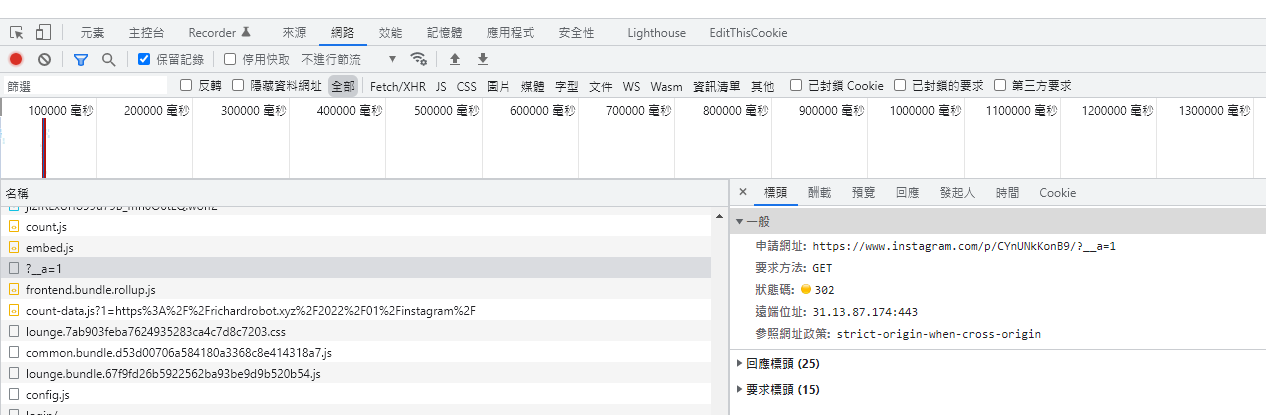
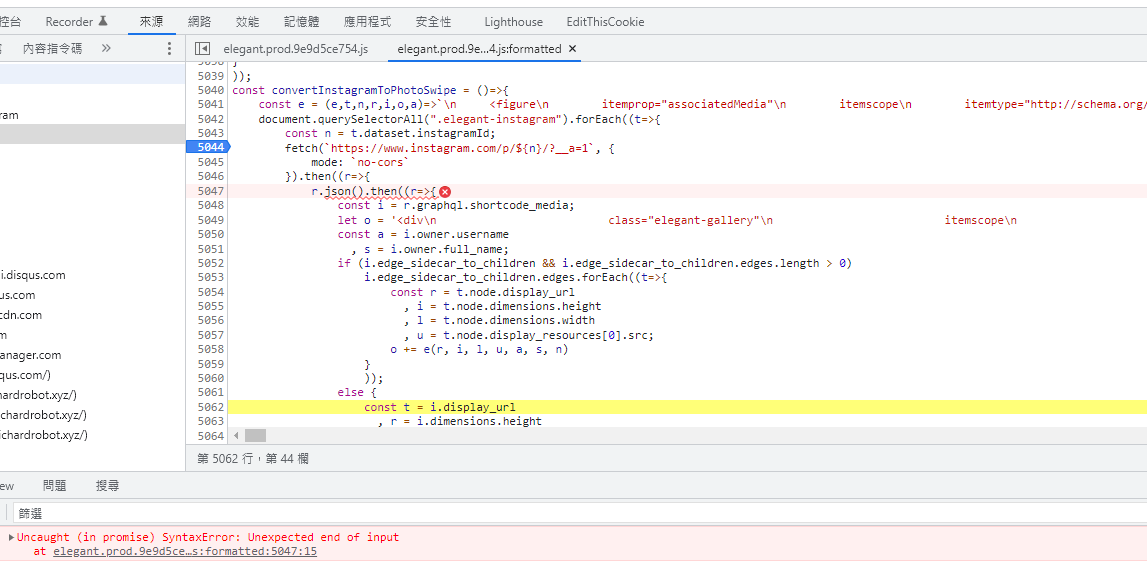
回應 302 後,請求會轉到 Instagram 登入頁面,後續無法解析成 JSON。當時判斷可能需要 access token,讓請求帶有登入狀態。
access-control-expose-headers: X-IG-Set-WWW-Claim
alt-svc: h3=":443"; ma=3600,h3-29=":443"; ma=3600
cache-control: private, no-cache, no-store, must-revalidate
content-language: zh-tw
content-length: 0
content-security-policy: report-uri https://www.instagram.com/security/csp_report/; default-src 'self' https://www.instagram.com; img-src data: blob: https://*.fbcdn.net https://*.instagram.com https://*.cdninstagram.com https://*.facebook.com https://*.fbsbx.com https://*.giphy.com; font-src data: https://*.fbcdn.net https://*.instagram.com https://*.cdninstagram.com; media-src 'self' blob: https://www.instagram.com https://*.cdninstagram.com https://*.fbcdn.net; manifest-src 'self' https://www.instagram.com; script-src 'self' https://instagram.com https://www.instagram.com https://*.www.instagram.com https://*.cdninstagram.com wss://www.instagram.com https://*.facebook.com https://*.fbcdn.net https://*.facebook.net 'unsafe-inline' 'unsafe-eval' blob:; style-src 'self' https://*.www.instagram.com https://www.instagram.com 'unsafe-inline'; connect-src 'self' https://instagram.com https://www.instagram.com https://*.www.instagram.com https://graph.instagram.com https://*.graph.instagram.com https://i.instagram.com/graphql_www https://graphql.instagram.com https://*.cdninstagram.com https://api.instagram.com https://i.instagram.com https://*.i.instagram.com wss://www.instagram.com wss://edge-chat.instagram.com https://*.facebook.com https://*.fbcdn.net https://*.facebook.net chrome-extension://boadgeojelhgndaghljhdicfkmllpafd blob:; worker-src 'self' blob: https://www.instagram.com; frame-src 'self' https://instagram.com https://www.instagram.com https://*.instagram.com https://staticxx.facebook.com https://www.facebook.com https://web.facebook.com https://connect.facebook.net https://m.facebook.com; object-src 'none'; upgrade-insecure-requests
content-type: text/html; charset=utf-8
date: Wed, 12 Jan 2022 06:27:35 GMT
expires: Sat, 01 Jan 2000 00:00:00 GMT
location: https://www.instagram.com/accounts/login/
pragma: no-cache
set-cookie: mid=Yd501wALAAE2tYIXNpy3T6lgubqt; Domain=.instagram.com; expires=Fri, 12-Jan-2024 06:27:35 GMT; Max-Age=63072000; Path=/; Secure
set-cookie: ig_did=B725DF97-76E5-4F3A-915A-366CD821B3A9; Domain=.instagram.com; expires=Fri, 12-Jan-2024 06:27:35 GMT; HttpOnly; Max-Age=63072000; Path=/; Secure
set-cookie: ig_nrcb=1; Domain=.instagram.com; expires=Thu, 12-Jan-2023 06:27:35 GMT; Max-Age=31536000; Path=/; Secure
strict-transport-security: max-age=31536000
vary: Accept-Language, Cookie
x-aed: 48
x-content-type-options: nosniff
x-fb-trip-id: 1679558926
x-frame-options: SAMEORIGIN
x-ig-origin-region: prn
x-ig-push-state: c2
x-ig-request-end-time: 1939701098
x-ig-request-start-time: 1939701061.9430351
x-xss-protection: 0
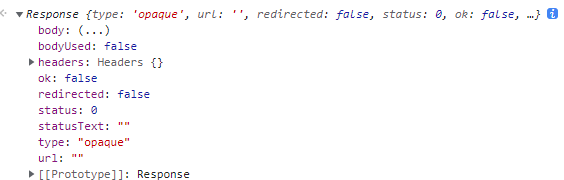
目前仍未解決 302。登入 Instagram 後再次 GET,雖然收到 200,回傳物件的狀態仍是 status:0。參考:Fetch 的使用注意事項
*引用:
很多人會認為只要將 fetch 裡的屬性 mode,調整成mode: 'no-cors',就可以避免 CORS,其實不是!mode: 'no-cors在設定上的意義是,告訴瀏覽器,我本來就知道 server 對於這個 request 是沒有設定可以存取 CORS 的,我本來就拿不到 response,我設定mode: 'no-cors,是為了,就算無法存取,也不要跑到 .catch() 那邊,讓它出現 Error。
一樣拿不到 server 的 response,但會拿到一個status: 0的 response。*
結論:在 CORS 限制下,只有伺服器允許跨來源存取,瀏覽器端才能取得 response;設定 no-cors 並不會解除限制。
參考資料:
深入認識跨域請求
所謂的跨域請求(CORS),並非加個Access-Control-Allow-Origin就解決了,無論前後端,都要深入認識並瞭解安全議題
 林信良
林信良
深入了解 CORS (跨來源資源共用): 如何正確設定 CORS?
這篇文章將會帶你了解 CORS (Cross-Origin Resource Sharing) 的概念和設定方法,確保您的網站能在遵守同源政策的前提下正確處理跨來源請求。學習如何設定 Access-Control-Allow-Methods、Access-Control-Allow-Headers、Access…